Arrears from earlier periods
Closing a period never writes money off. A bill still unpaid at close becomes an arrears item, and Letnook keeps it in view until it is collected.
Where arrears come from
- Closing a period: every let space with a complete bill that is still unpaid.
- A move-out whose final bill was not paid and was not settled from the deposit.
Each item is a sealed copy of that bill, with its tax, so later changes to rent or tax do not alter what is owed.
Where you see them
On Collect under Outstanding, an Arrears group sits above this period's list, with each item's space, tenant, From period and amount. The space screen shows Arrears with the amount, and the Overview's Outstanding figure notes how much is arrears.
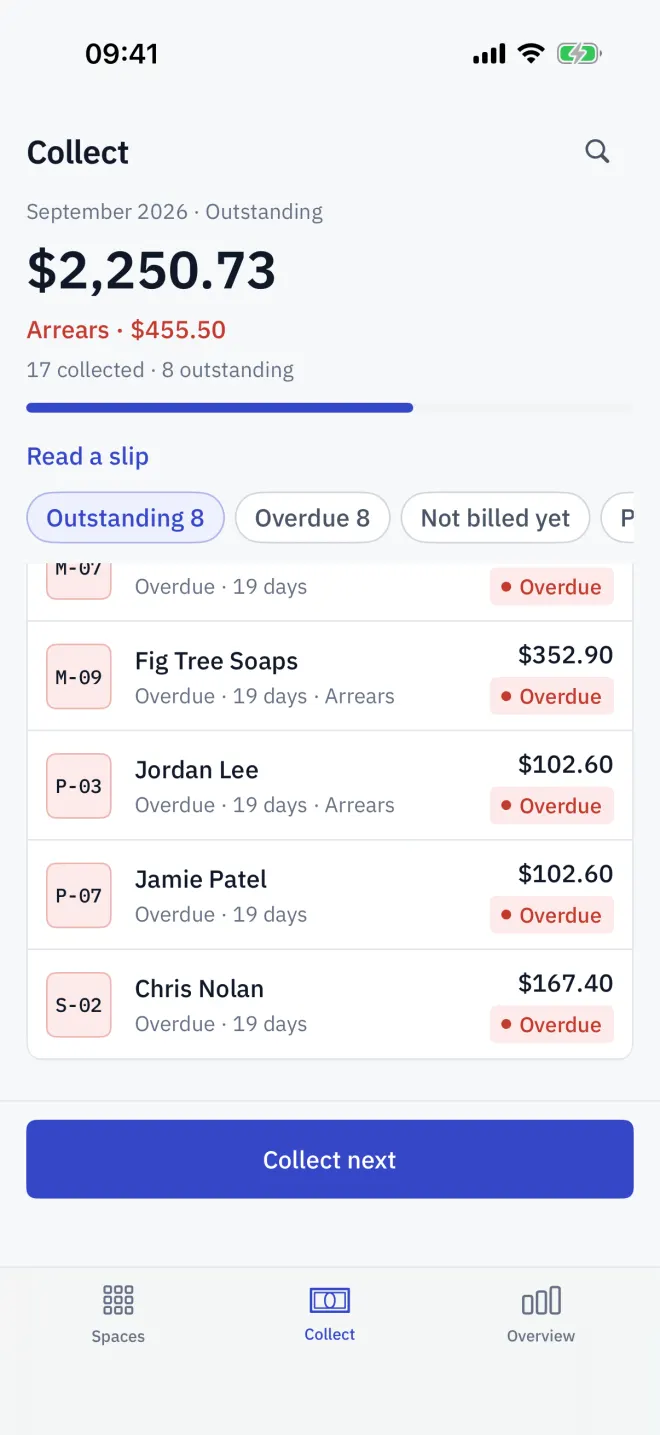
Collect arrears
-
1Open
Open the item
Tap an arrears row, or Collect arrears when this period is settled. The space screen's arrears link opens the oldest one.
-
2Pay
Take the payment
The payment sheet shows that bill's period and amount. Take it by QR, transfer or cash, and mark it received.
Read next
Closing the period
Close the Letnook period from Overview: bills are sealed, unpaid ones become arrears, meters roll forward, one-off fees clear and the next month opens.
NextMove-out and deposits
End a Letnook tenancy with a move-out statement: final bill, deposit held, deductions, arrears settled from the deposit, and the refund or balance due.
NextThe collection round
Work through Letnook's Collect tab: the outstanding total, filters for overdue, not billed and paid spaces, arrears from earlier periods, and Collect next.