Bills and receipts
Every let space has a live bill for the period. Once it is paid, the same document becomes a receipt.
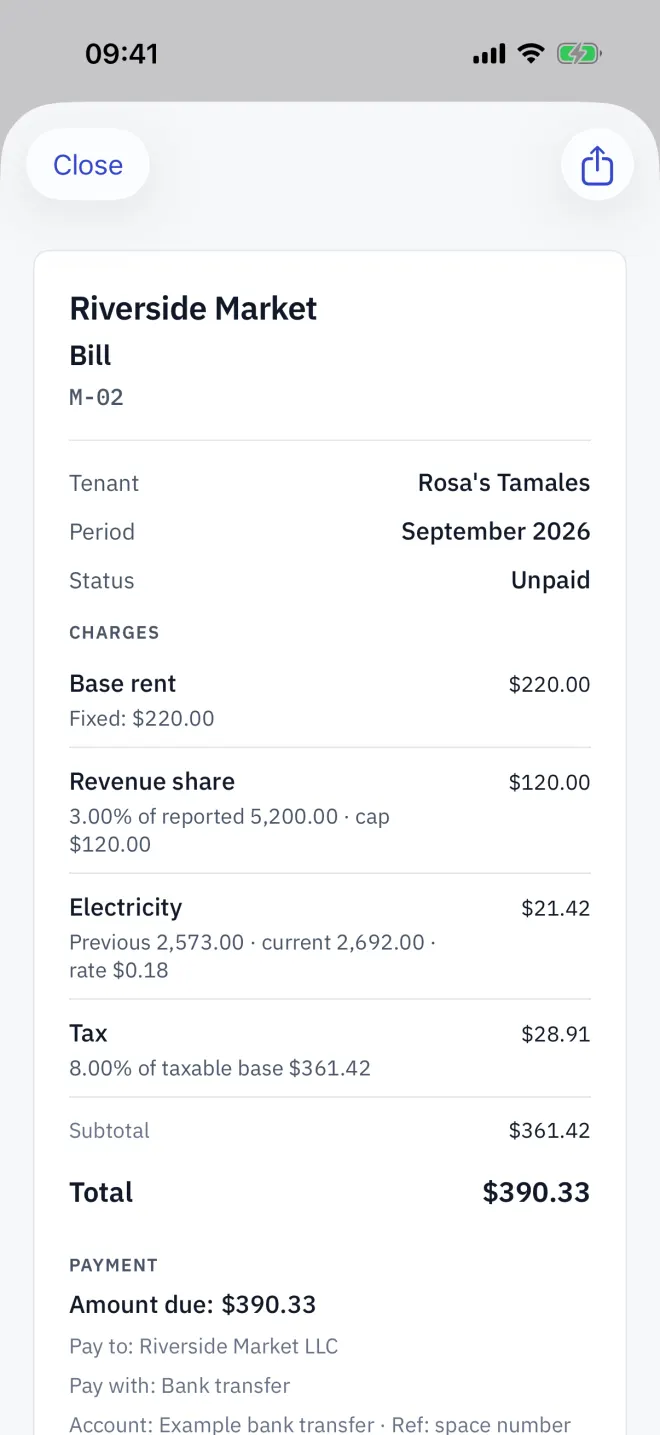
Open a bill
On a let space, tap Bill / receipt. It is also one tap away from the payment sheet: View bill / receipt.
What it shows
- The site name, Bill or Receipt, and the space code.
- Tenant, Period and Status — Paid or Unpaid.
- Each charge with how it was worked out: the fixed amount, the meter's previous and current reading and rate, or the share of reported turnover and its cap.
- Tax, Subtotal and Total.
- How to pay — Pay to, Pay with and the account — or, on a receipt, when it was paid, by which method, and the Bank reference.
While a reading or turnover is missing, the bill shows no total and says it is waiting for all readings or declarations.
Send it
Tap the share button to send the bill as an image through Messages, LINE, WhatsApp, mail or any app on your phone.
Read next
Charge rules
Set what a Letnook space is charged: base rent, a revenue share of declared turnover with a cap, metered electricity or water, fixed extras, late fees and discounts.
NextRecording a payment
Take a payment in Letnook: show a QR code with the exact amount (PromptPay, QRIS, Pix, VietQR, KHQR), your own QR, bank details or cash, then mark it received.
NextBill history
Every closed Letnook period leaves a sealed bill on each space. Open it from Recent activity, share it, and rely on it not changing when rents or tax change.